

Apple mail to Thunderbird conversion is complicated and thereby are performed with the help of email converters. However, not all converters produce satisfactory results. A lot of converters are incapable and thereby give out partial conversions. At this stage, however, we shall not discuss the incompetency of these average tools. We shall on the contrary introduce you to a tool that stands out in the crowd.
Mail Extractor Max is a unique tool that holds the capacity to perfectly turn the Apple mails to Thunderbird. This tool has some amazing features and has been proven to be the best in the market. This article shall further discuss the conversion process of this tool for converting Apple mail to Thunderbird.
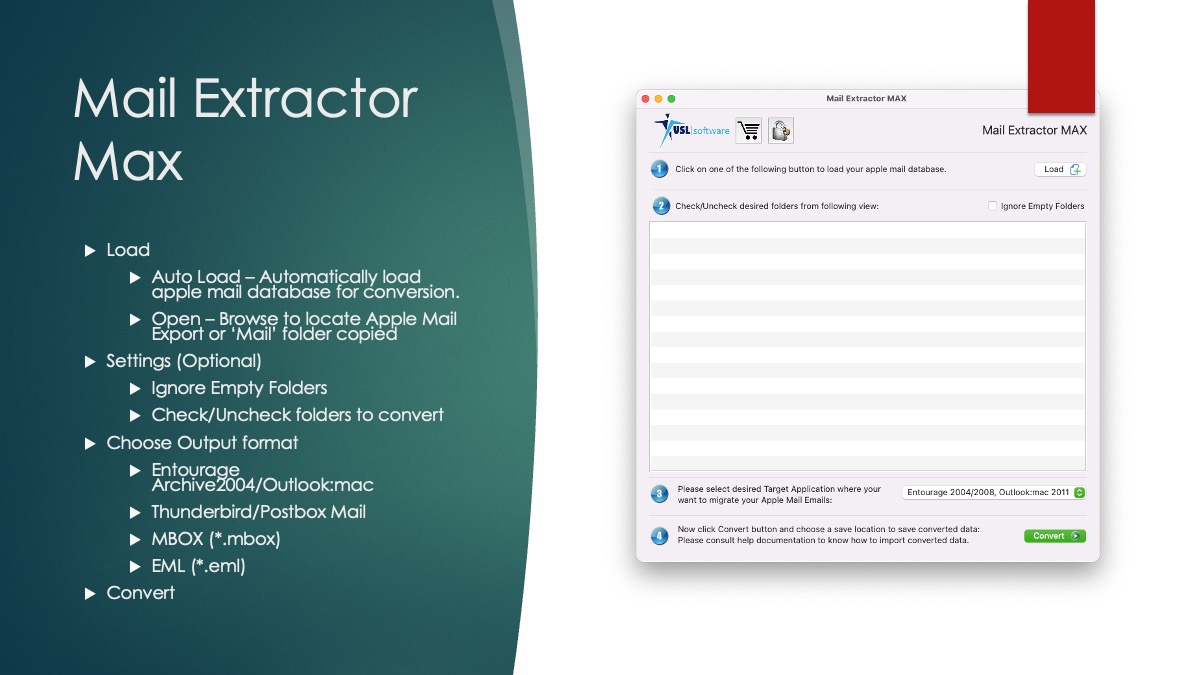
Master the Apple mail to Thunderbird conversion process of Mail Extractor Max
Mastering the conversion process of any tool can become much easier if it is organised smartly. Mail Extractor Max promises an extremely easy conversion process to its users for getting precise and standard conversion results every single time. A detailed account of Mac Apple mail conversion process using Mail Extractor Max is given below:
STEP 1
The first obvious step is to install the tool on your system. Ensure that the system requirements as well as administrative permissions are in place to avoid any hurdles in the installation. Once the tool is installed, launch it on the screen to begin with the Apple mail to Thunderbird conversion process.
STEP 2
A window will appear with upload prompt on it. You will be given two options-auto load and open.
Auto load The auto load option allows you to get the files uploaded directly from the “Mail” folder on your Mac. This is basically the default location for storing your mail database.
Open This option lets you upload the files from a different location. If you have exported the files and stored them elsewhere then using this option you can locate them and upload them.
STEP 3
After having uploaded the files, the next step is to check or unckeck the desired folders. At this step you can see a list of folders that have been uploaded for the Apple mail to Thunderbird conversion process. From this order of checkboxes, you can either choose to keep all of them or you can remove any of those that are not desired by you for Apple mail to Thunderbird conversion. You can also utilise the option of ignoring the empty folders.
STEP 4
After finalising the files to be converted, move ahead and choose the output option. There will be a list of choices such as Outlook, EML, Entourage, Thunderbird, etc as this tool can convert to multiple outputs. Since you want to convert Apple mail to Thunderbird, thereby the output should be fixed accordingly.
STEP 5
The final step is to choose a location for the output data and then hit on convert. A log report can be accessed from the screen to check the conversion progress. Once the process is completed, the files can be accessed from the saved location and can thereafter be directly used in Thunderbird.
 USL Software